Widget styles — Flat, Glass, Liquid, Neon
The four looks for your bubbles, and what makes each one different.
The widget style skins every bubble in the app — dashboard, pages, sidebar included.
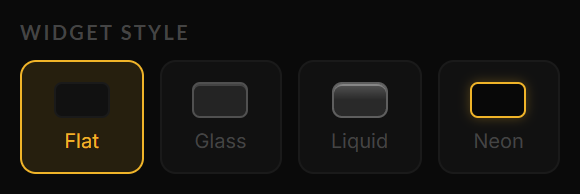
The four styles in the ⊹ panel, each with its mini preview.
| Style | Look |
|---|---|
| Flat | Opaque, minimal, maximum readability. The default. |
| Glass | Translucent frosted panels — the background shows through a blur. |
| Liquid | Glass, plus a light distortion that follows your cursor over the dashboard. The most alive of the four. |
| Neon | Dark panels with a glowing accent-colored border — terminal energy. |
Switch styles from the ⊹ panel. The style is saved per account.
Glass and Liquid shine with an animated or photo background behind them — that’s what the translucency reveals.
Still stuck? Contact support — or send feedback from the app: profile menu → Settings → Feedback.